
Reading the Source Code of AndroidAnnotations (1) - Basic Principles
AndroidAnnotations is an open-source framework that accelerates development, as can be seen from its name, which simplifies code by providing rich annotations.
Usage is not introduced here; the official documentation is very detailed: http://androidannotations.org/. Our goal is to understand how this framework is implemented.
1. Composition of the Framework
When using AndroidAnnotations, for example, we write an Activity like this:
@EActivity(R.layout.activity_main)
public class MainActivity extends Activity {

    @ViewById
    TextView textView;

    @Override
    protected void onCreate(Bundle savedInstanceState) {
        super.onCreate(savedInstanceState);
    }

    @AfterViews
    public void init(){
        textView.setText("Hello world!");
    }
}@EActivity(R.layout.activity_main)
public class MainActivity extends Activity {
@ViewById
TextView textView;
@Override
protected void onCreate(Bundle savedInstanceState) {
super.onCreate(savedInstanceState);
}
@AfterViews
public void init(){
textView.setText("Hello world!");
}
}If we register MainActivity in AndroidManifest.xml using <activity android:name=".MainActivity">, a compilation error will occur, and we need to change MainActivity to MainActivity_ for it to compile successfully. We can find the class MainActivity_ in the project directory, and the code for this class is as follows:
public final class MainActivity_
    extends MainActivity
    implements HasViews, OnViewChangedListener
{

    private final OnViewChangedNotifier onViewChangedNotifier_ = new OnViewChangedNotifier();

    @Override
    public void onCreate(Bundle savedInstanceState) {
        OnViewChangedNotifier previousNotifier = OnViewChangedNotifier.replaceNotifier(onViewChangedNotifier_);
        init_(savedInstanceState);
        super.onCreate(savedInstanceState);
        OnViewChangedNotifier.replaceNotifier(previousNotifier);
        setContentView(layout.activity_main);
    }

    private void init_(Bundle savedInstanceState) {
        OnViewChangedNotifier.registerOnViewChangedListener(this);
    }

    @Override
    public void setContentView(int layoutResID) {
        super.setContentView(layoutResID);
        onViewChangedNotifier_.notifyViewChanged(this);
    }

    @Override
    public void setContentView(View view, LayoutParams params) {
        super.setContentView(view, params);
        onViewChangedNotifier_.notifyViewChanged(this);
    }

    @Override
    public void setContentView(View view) {
        super.setContentView(view);
        onViewChangedNotifier_.notifyViewChanged(this);
    }

    public static MainActivity_.IntentBuilder_ intent(Context context) {
        return new MainActivity_.IntentBuilder_(context);
    }

    @Override
    public void onViewChanged(HasViews hasViews) {
        textView = ((TextView) hasViews.findViewById(id.textView));
        init();
    }

    public static class IntentBuilder_
        extends ActivityIntentBuilder<MainActivity_.IntentBuilder_>
    {

        public IntentBuilder_(Context context) {
            super(context, MainActivity_.class);
        }

        @Override
        public void startForResult(int requestCode) {
            if (context instanceof Activity) {
                Activity activity = ((Activity) context);
                activity.startActivityForResult(intent, requestCode);
            } else {
                context.startActivity(intent);
            }
        }

    }
}
public final class MainActivity_
extends MainActivity
implements HasViews, OnViewChangedListener
{
private final OnViewChangedNotifier onViewChangedNotifier_ = new OnViewChangedNotifier();
@Override
public void onCreate(Bundle savedInstanceState) {
OnViewChangedNotifier previousNotifier = OnViewChangedNotifier.replaceNotifier(onViewChangedNotifier_);
init_(savedInstanceState);
super.onCreate(savedInstanceState);
OnViewChangedNotifier.replaceNotifier(previousNotifier);
setContentView(layout.activity_main);
}
private void init_(Bundle savedInstanceState) {
OnViewChangedNotifier.registerOnViewChangedListener(this);
}
@Override
public void setContentView(int layoutResID) {
super.setContentView(layoutResID);
onViewChangedNotifier_.notifyViewChanged(this);
}
@Override
public void setContentView(View view, LayoutParams params) {
super.setContentView(view, params);
onViewChangedNotifier_.notifyViewChanged(this);
}
@Override
public void setContentView(View view) {
super.setContentView(view);
onViewChangedNotifier_.notifyViewChanged(this);
}
public static MainActivity_.IntentBuilder_ intent(Context context) {
return new MainActivity_.IntentBuilder_(context);
}
@Override
public void onViewChanged(HasViews hasViews) {
textView = ((TextView) hasViews.findViewById(id.textView));
init();
}
public static class IntentBuilder_
extends ActivityIntentBuilder<MainActivity_.IntentBuilder_>
{
public IntentBuilder_(Context context) {
super(context, MainActivity_.class);
}
@Override
public void startForResult(int requestCode) {
if (context instanceof Activity) {
Activity activity = ((Activity) context);
activity.startActivityForResult(intent, requestCode);
} else {
context.startActivity(intent);
}
}
}
}MainActivity_ is generated during project compilation, and this class is the one actually used at runtime. It extends the MainActivity class we wrote and implements interfaces such as HasViews. These additional interfaces and classes come from the org.androidannotations.api package.
We can see that the AndroidAnnotations framework can be divided into two parts: one part is responsible for code generation, while the other part serves as a library used in the generated code.
When using the AndroidAnnotations framework, we need two jar files: androidannotations.jar and androidannotations-api.jar. Among them, androidannotations.jar is responsible for generating code, while androidannotations-api.jar serves as a library.
androidannotations-api.jar
Directory Structure
Let's start with androidannotations-api. The code directory of this package is shown in the following image, mainly divided into annotations and api sections.
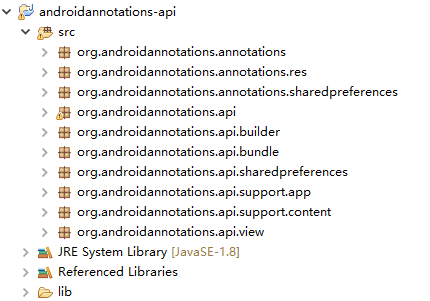
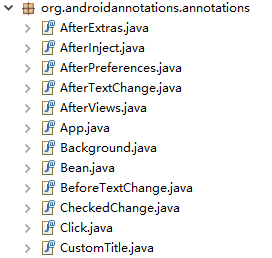
The annotations section defines various annotations.
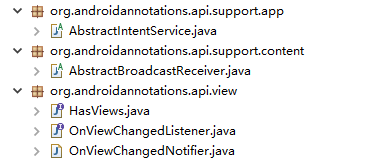
The api section provides various classes and interfaces, which are used in the generated code through inheritance, composition, etc.
androidannotations.jar
androidannotations.jar is used during project compilation. It utilizes the Annotation Processing Tool (APT) and JCodeModel to generate code at compile time.
Introduction to APT
APT (Annotation Processing Tool) is a tool for processing annotations. It detects annotations in source code files and performs additional processing on these annotations. APT automatically searches for all classes that inherit from AbstractProcessor at compile time and calls their process methods to handle annotations. (The APT-related APIs in the com.sun.mirror package have been deprecated, and the previous APIs are now replaced by javax.annotation.processing and javax.lang.model.)
For example, for an annotation like this:
@Retention(RetentionPolicy.RUNTIME)
@Target(ElementType.METHOD)
public @interface MethodInfo {
    String author() default "";
}@Retention(RetentionPolicy.RUNTIME)
@Target(ElementType.METHOD)
public @interface MethodInfo {
String author() default "";
}We can use the following annotation processor to handle it:
@SupportedAnnotationTypes({ "com.mytest.MethodInfo" })
public class MethodInfoProcessor extends AbstractProcessor {

    @Override
    public boolean process(Set<? extends TypeElement> annotations, RoundEnvironment env) {
        HashMap<String, String> map = new HashMap<String, String>();
        for (TypeElement te : annotations) {
            for (Element element : env.getElementsAnnotatedWith(te)) {
                MethodInfo methodInfo = element.getAnnotation(MethodInfo.class);
                map.put(element.getEnclosingElement().toString(), methodInfo.author());
            }
        }
        return false;
    }
}@SupportedAnnotationTypes({ "com.mytest.MethodInfo" })
public class MethodInfoProcessor extends AbstractProcessor {
@Override
public boolean process(Set<? extends TypeElement> annotations, RoundEnvironment env) {
HashMap<String, String> map = new HashMap<String, String>();
for (TypeElement te : annotations) {
for (Element element : env.getElementsAnnotatedWith(te)) {
MethodInfo methodInfo = element.getAnnotation(MethodInfo.class);
map.put(element.getEnclosingElement().toString(), methodInfo.author());
}
}
return false;
}
}For more information, please refer to: Java Annotation and Analysis of Several Common Open Source Project Annotations
Introduction to JCodeModel
JCodeModel is a Java library used for generating Java code. It provides a way to generate Java programs through Java programs. For example, executing the following code:
File destDir = new File("src");
JCodeModel codeModel = new JCodeModel();
JDefinedClass clazz = codeModel._class(JMod.PUBLIC, "com.test.Hello", ClassType.CLASS);
JMethod mainMethod = clazz.method(JMod.PUBLIC+JMod.STATIC, codeModel.VOID, "main");
mainMethod.param(codeModel.parseType("String[]"), "args");
mainMethod.body().invoke(codeModel.ref("java.lang.System").staticRef("out"),"println").arg("Hello,world!");
codeModel.build(destDir);
File destDir = new File("src");
JCodeModel codeModel = new JCodeModel();
JDefinedClass clazz = codeModel._class(JMod.PUBLIC, "com.test.Hello", ClassType.CLASS);
JMethod mainMethod = clazz.method(JMod.PUBLIC+JMod.STATIC, codeModel.VOID, "main");
mainMethod.param(codeModel.parseType("String[]"), "args");
mainMethod.body().invoke(codeModel.ref("java.lang.System").staticRef("out"),"println").arg("Hello,world!");
codeModel.build(destDir);will generate the following class:
public class Hello {
    public static void main(String[] args) {
        System.out.println("Hello,world!");
    }
}
public class Hello {
public static void main(String[] args) {
System.out.println("Hello,world!");
}
}For more information, please refer to: Generating Java with Java – Introduction to CodeModel
Directory Structure
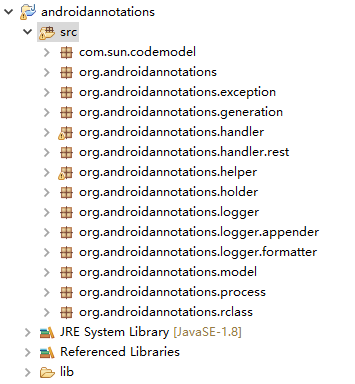
- com.sun.codemodel: Only contains the JSuperWildcard class, which solves the problem of CodeModel not being able to model "? super X".
- org.androidannotations: Contains the AndroidAnnotationProcessor class (inherited from AbstractProcessor, i.e., the annotation processor mentioned above), which serves as the entry point for the annotation processing program and controls the entire processing flow.
- org.androidannotations.exception: Defines exception types.
- org.androidannotations.generation: Writes the final processing results (generated code) to files.
- org.androidannotations.handler: Corresponds to the annotations in androidannotations-api.jar, verifying and processing the corresponding annotations (for example, checking whether method parameters, return values, etc., comply with requirements for annotations applied to methods).
- org.androidannotations.helper: Helper classes mainly used during handler verification and annotation processing (for example, checking whether a method is private, whether ResId in annotations exists, and includes other utility classes for naming conventions).
- org.androidannotations.holder: Used to describe and store code structure (using CodeModel).
- org.androidannotations.logger: Logs messages.
- org.androidannotations.model: Annotation models and related operations (such as extracting annotations).
- org.androidannotations.process: Controls handlers to verify and process annotations.
- org.androidannotations.rclass: Operations related to R.class, including finding R.class, retrieving values from R.class, etc.
2. Viewing Execution Flow through Log Files
Based on MainActivity, we add a SecondActivity, which contains no code.
@EActivity(R.layout.activity_second)
public class SecondActivity extends Activity {
}@EActivity(R.layout.activity_second)
public class SecondActivity extends Activity {
}After the project is compiled, we can find the androidannotations.log log file, which records the general workflow of the androidannotations.jar package.
19:19:20.59 [Worker-8] INFO  o.a.AndroidAnnotationProcessor:83 - Initialize AndroidAnnotations 3.3.2 with options {phase=BUILD}
19:19:20.262 [Worker-8] INFO  o.a.AndroidAnnotationProcessor:107 - Start processing for 3 annotations on 4 elements
19:19:20.294 [Worker-8] DEBUG o.a.h.AndroidManifestFinder:137 - AndroidManifest.xml file found in parent folder D:\AndroidProjects\AnnotationExample: D:\AndroidProjects\AnnotationExample\AndroidManifest.xml
19:19:20.340 [Worker-8] INFO  o.a.AndroidAnnotationProcessor:170 - AndroidManifest.xml found: AndroidManifest [applicationPackage=com.annotation.example, componentQualifiedNames=[com.annotation.example.MainActivity_, com.annotation.example.SecondActivity_], permissionQualifiedNames=[], applicationClassName=null, libraryProject=false, debugabble=false, minSdkVersion=8, maxSdkVersion=-1, targetSdkVersion=22]
19:19:20.356 [Worker-8] INFO  o.a.r.ProjectRClassFinder:50 - Found project R class: com.annotation.example.R
19:19:20.387 [Worker-8] INFO  o.a.r.AndroidRClassFinder:44 - Found Android class: android.R
19:19:20.512 [Worker-8] INFO  o.a.p.ModelValidator:42 - Validating elements
19:19:20.512 [Worker-8] DEBUG o.a.p.ModelValidator:62 - Validating with EActivityHandler: [com.annotation.example.MainActivity, com.annotation.example.SecondActivity]
19:19:20.528 [Worker-8] DEBUG o.a.p.ModelValidator:62 - Validating with ViewByIdHandler: [textView]
19:19:20.544 [Worker-8] DEBUG o.a.p.ModelValidator:62 - Validating with AfterViewsHandler: [public void init() ]
19:19:20.575 [Worker-8] INFO  o.a.p.ModelProcessor:74 - Processing root elements
19:19:20.575 [Worker-8] DEBUG o.a.p.ModelProcessor:176 - Processing root elements EActivityHandler: [com.annotation.example.MainActivity, com.annotation.example.SecondActivity]
19:19:20.684 [Worker-8] INFO  o.a.p.ModelProcessor:86 - Processing enclosed elements
19:19:20.715 [Worker-8] INFO  o.a.AndroidAnnotationProcessor:249 - Number of files generated by AndroidAnnotations: 2
19:19:20.715 [Worker-8] INFO  o.a.g.ApiCodeGenerator:52 - Writting following API classes in project: []
19:19:20.731 [Worker-8] DEBUG o.a.g.SourceCodewriter:55 - Generating class: com.annotation.example.MainActivity_
19:19:20.778 [Worker-8] DEBUG o.a.g.SourceCodewriter:55 - Generating class: com.annotation.example.SecondActivity_
19:19:20.794 [Worker-8] INFO  o.a.p.TimeStats:81 - Time measurements: [Whole Processing = 532 ms], [Process Annotations = 156 ms], [Find R Classes = 141 ms], [Generate Sources = 79 ms], [Validate Annotations = 47 ms], [Extract Manifest = 46 ms], [Extract Annotations = 16 ms],
19:19:20.809 [Worker-8] INFO  o.a.AndroidAnnotationProcessor:121 - Finish processing
19:19:20.59 [Worker-8] INFO o.a.AndroidAnnotationProcessor:83 - Initialize AndroidAnnotations 3.3.2 with options {phase=BUILD}
19:19:20.262 [Worker-8] INFO o.a.AndroidAnnotationProcessor:107 - Start processing for 3 annotations on 4 elements
19:19:20.294 [Worker-8] DEBUG o.a.h.AndroidManifestFinder:137 - AndroidManifest.xml file found in parent folder D:\AndroidProjects\AnnotationExample: D:\AndroidProjects\AnnotationExample\AndroidManifest.xml
19:19:20.340 [Worker-8] INFO o.a.AndroidAnnotationProcessor:170 - AndroidManifest.xml found: AndroidManifest [applicationPackage=com.annotation.example, componentQualifiedNames=[com.annotation.example.MainActivity_, com.annotation.example.SecondActivity_], permissionQualifiedNames=[], applicationClassName=null, libraryProject=false, debugabble=false, minSdkVersion=8, maxSdkVersion=-1, targetSdkVersion=22]
19:19:20.356 [Worker-8] INFO o.a.r.ProjectRClassFinder:50 - Found project R class: com.annotation.example.R
19:19:20.387 [Worker-8] INFO o.a.r.AndroidRClassFinder:44 - Found Android class: android.R
19:19:20.512 [Worker-8] INFO o.a.p.ModelValidator:42 - Validating elements
19:19:20.512 [Worker-8] DEBUG o.a.p.ModelValidator:62 - Validating with EActivityHandler: [com.annotation.example.MainActivity, com.annotation.example.SecondActivity]
19:19:20.528 [Worker-8] DEBUG o.a.p.ModelValidator:62 - Validating with ViewByIdHandler: [textView]
19:19:20.544 [Worker-8] DEBUG o.a.p.ModelValidator:62 - Validating with AfterViewsHandler: [public void init() ]
19:19:20.575 [Worker-8] INFO o.a.p.ModelProcessor:74 - Processing root elements
19:19:20.575 [Worker-8] DEBUG o.a.p.ModelProcessor:176 - Processing root elements EActivityHandler: [com.annotation.example.MainActivity, com.annotation.example.SecondActivity]
19:19:20.684 [Worker-8] INFO o.a.p.ModelProcessor:86 - Processing enclosed elements
19:19:20.715 [Worker-8] INFO o.a.AndroidAnnotationProcessor:249 - Number of files generated by AndroidAnnotations: 2
19:19:20.715 [Worker-8] INFO o.a.g.ApiCodeGenerator:52 - Writting following API classes in project: []
19:19:20.731 [Worker-8] DEBUG o.a.g.SourceCodewriter:55 - Generating class: com.annotation.example.MainActivity_
19:19:20.778 [Worker-8] DEBUG o.a.g.SourceCodewriter:55 - Generating class: com.annotation.example.SecondActivity_
19:19:20.794 [Worker-8] INFO o.a.p.TimeStats:81 - Time measurements: [Whole Processing = 532 ms], [Process Annotations = 156 ms], [Find R Classes = 141 ms], [Generate Sources = 79 ms], [Validate Annotations = 47 ms], [Extract Manifest = 46 ms], [Extract Annotations = 16 ms],
19:19:20.809 [Worker-8] INFO o.a.AndroidAnnotationProcessor:121 - Finish processing
Comments
No comments yet. Be the first to comment!