
Reading the Source Code of AndroidAnnotations (2) — Workflow
In the previous article, we roughly understood the basic principles of AndroidAnnotations. This article will detail the workflow of this framework.
Workflow
First is the AndroidAnnotationProcessor class, which inherits from AbstractProcessor, the annotation processor mentioned earlier. It is the entry point for the annotation processing and controls the entire processing flow.
AndroidAnnotationProcessor overrides the getSupportedAnnotationTypes method.
@Override
public Set<String> getSupportedAnnotationTypes() {
    return annotationHandlers.getSupportedAnnotationTypes();
}@Override
public Set<String> getSupportedAnnotationTypes() {
return annotationHandlers.getSupportedAnnotationTypes();
}The annotationHandlers class stores the names of over a hundred annotations supported by AndroidAnnotations and their corresponding Handlers.
The class diagram of AndroidAnnotationProcessor is as follows:
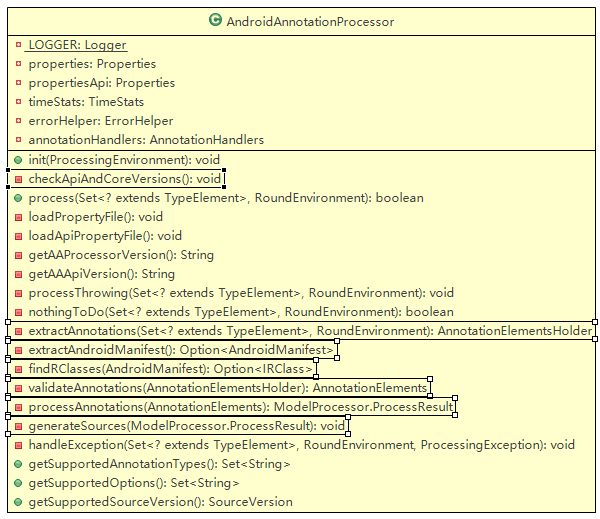
Based on the log output from the previous article and the class diagram above, we can see that the workflow of AndroidAnnotations is divided into the following seven steps:
- Check if the core and API version numbers match (checkApiAndCoreVersion)
- Find and parse the Manifest file (extractAndroidManifest)
- Find and merge android.R.class and the project's R.class (findRClasses)
- Extract annotations (extractAnnotations)
- Validate annotations (validateAnnotations)
- Process annotations (processAnnotations)
- Generate code files (generateSources)
1. Check if the core and API version numbers match
Completed by AndroidAnnotationProcessor itself
The androidannotations.jar contains the androidannotations.properties file, and the androidannotations-api.jar contains the androidannotations-api.properties file, which are compared for version numbers.
private void checkApiAndCoreVersions() throws VersionMismatchException {
  String apiVersion = getAAApiVersion();
  String coreVersion = getAAProcessorVersion();

  if (!apiVersion.equals(coreVersion)) {
    LOGGER.error("AndroidAnnotations version for API ({}) and core ({}) doesn't match. Please check your classpath", apiVersion, coreVersion);
    throw new VersionMismatchException("AndroidAnnotations version for API (" + apiVersion + ") and core (" + coreVersion + ") doesn't match. Please check your classpath");
  }
}
private void checkApiAndCoreVersions() throws VersionMismatchException {
String apiVersion = getAAApiVersion();
String coreVersion = getAAProcessorVersion();
if (!apiVersion.equals(coreVersion)) {
LOGGER.error("AndroidAnnotations version for API ({}) and core ({}) doesn't match. Please check your classpath", apiVersion, coreVersion);
throw new VersionMismatchException("AndroidAnnotations version for API (" + apiVersion + ") and core (" + coreVersion + ") doesn't match. Please check your classpath");
}
}2. Find and parse the Manifest file
Completed by AndroidManifestFinder in the helper package
AndroidManifestFinder searches for the Manifest file and parses its components, permissions, etc., storing the results in (helper.)AndroidManifest.
This step can be divided into two parts: searching and parsing:
- Find the Manifest file
If the path to AndroidManifest.xml is specified in the APT parameters, then the Finder searches directly in the specified path; if not specified, the Finder starts searching from the project's root directory, and if not found, it searches in the parent directory. - Parse the AndroidManifest.xml file
This part extracts various components, permissions, etc., from the XML and stores them in the AndroidManifest object.
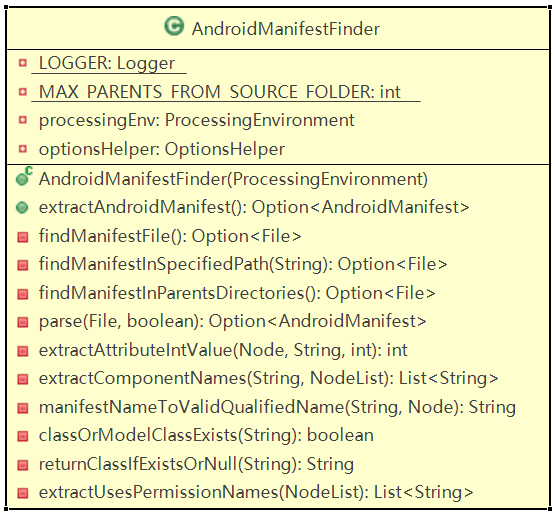
The manifestNameToValidQualifiedName method in AndroidManifestFinder is used to convert the abbreviated .MainActivity_ in AndroidManifest.xml into the fully qualified name com.annotation.example.MainActivity_, allowing the corresponding component class to be found based on the component name.
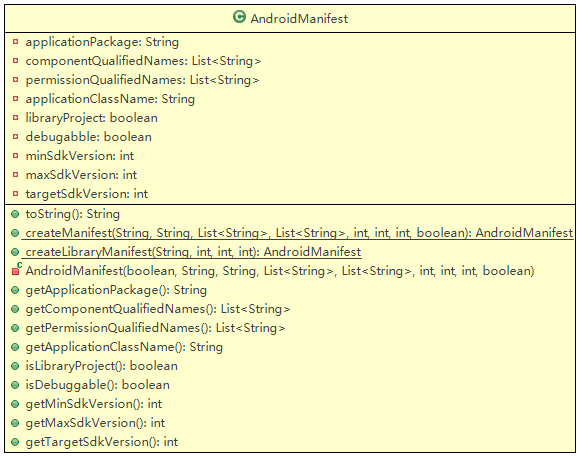
The AndroidManifest class is used to store the parsed components, permissions, etc.
3. Find and merge android.R.class and the project's R.class
Completed by AndroidRClassFinder and ProjectRClassFinder in the rclass package
AndroidRClassFinder and ProjectRClassFinder search for android.R.class and the project's R.class, respectively, merging the contents of the two R classes into (rclass.)CompoundRClass.
These two Finders are relatively simple; for example, AndroidRClassFinder:
Elements elementUtils = processingEnv.getElementUtils();
TypeElement androidRType = elementUtils.getTypeElement("android.R");
Elements elementUtils = processingEnv.getElementUtils();
TypeElement androidRType = elementUtils.getTypeElement("android.R");ProcessingEnvironment processingEnv is passed to the annotation processor from APT, specifically in this project's AndroidAnnotationProcessor. Through processingEnv, we can obtain elementUtils, and calling its getTypeElement allows us to obtain the type element (class, interface, etc.) corresponding to the fully qualified name; here, TypeElement corresponds to android.R.class. This TypeElement will be passed to RClass as a constructor parameter.
List<? extends Element> rEnclosedElements = rClassElement.getEnclosedElements();
ElementFilter.typesIn(rEnclosedElements);List<? extends Element> rEnclosedElements = rClassElement.getEnclosedElements();
ElementFilter.typesIn(rEnclosedElements);typesIn returns a List
List<VariableElement> idFields = ElementFilter.fieldsIn(idEnclosedElements);List<VariableElement> idFields = ElementFilter.fieldsIn(idEnclosedElements);VariableElement represents the various fields in the inner class, from which we can obtain the names and corresponding values of the fields.
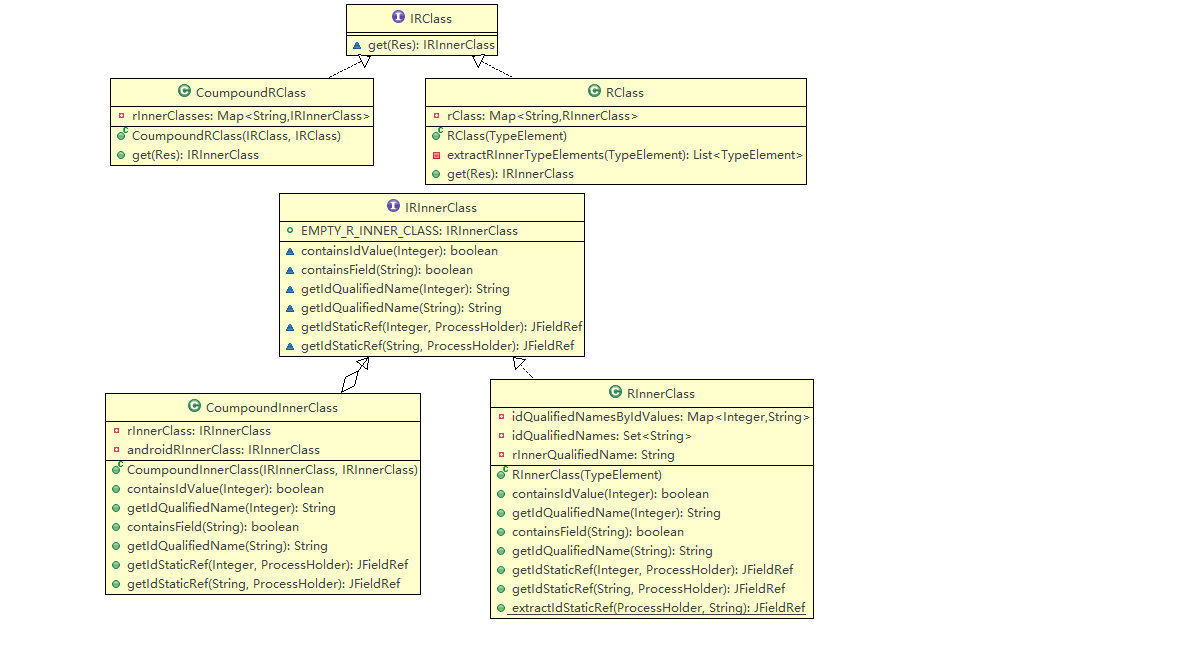
- IRClass is used to represent the R.class file
- IRInnerClass is used to represent the inner classes in R.class, such as attr, id, etc.
- CompoundInnerClass integrates resources of inner classes with the same name from android.R.class and the project's R.class
- CompoundRClass contains multiple CompoundInnerClass, integrating all resources from android.R.class and R.class.
Classes like Elements, TypeElement, and ElementFilter are all part of the javax.lang.model package. javax.lang.model is used to create models for the Java programming language, and its members are suitable for language modeling, language processing tasks, and APIs (including but not limited to annotation processing frameworks). Similar to JCodeModel, it also uses Java to describe Java code, but JCodeModel is more often seen as a Java code generator.
Since the code elements obtained from the annotation processing tool are represented using javax.lang.model., and the code we are going to generate is represented using com.sun.codemodel., for example, a method is represented by ExecutableElement in the former and by JMethod in the latter, the subsequent steps will involve converting between these two representations.
4. Extract annotations
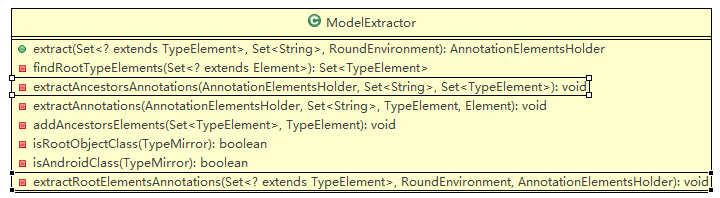
Completed by ModelExtractor in the model package
ModelExtractor extracts annotations from the code to be compiled, storing the extracted annotations in (model.)AnnotationElementsHolder.
The extraction of annotations by ModelExtractor is divided into two parts:
- Extract annotations from all ancestor classes of a class (extractAncestorsAnnotations)
- Extract annotations contained in the class itself (extractRootElementAnnotations)
Why extract annotations from ancestor classes?
We modified the previous SecondActivity to:
@EActivity(R.layout.activity_main)
public class SecondActivity extends MainActivity {
}@EActivity(R.layout.activity_main)
public class SecondActivity extends MainActivity {
}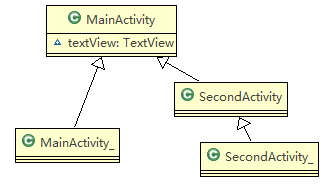
The textView in MainActivity uses the @ViewById annotation, and the generated MainActivity_ contains the findViewById(id.textView) statement for initialization. However, the SecondActivity class does not explicitly declare the textView using the @ViewById annotation, so processing only the annotations in the SecondActivity class cannot generate the findViewById(id.textView) statement. Therefore, we need to process the @ViewById annotation from MainActivity again in SecondActivity, so that textView can be initialized in SecondActivity_.
The annotations extracted at this stage are stored in AnnotationElementsHolder.
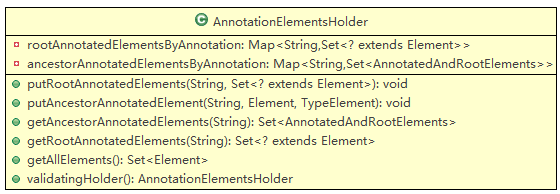
rootAnnotatedElementByAnnotation stores the annotations in the class, where String is the name of the annotation, and Set is the collection of elements annotated with that annotation. ancestorAnnotatedElementsByAnnotation stores the annotations in the ancestor classes of the class, where String is the name of the annotation, and Set is the collection of (elements annotated with that annotation in the ancestor classes, the class).
The two methods used for extracting annotations are described as follows:
- extractAncestorsAnnotations
Search upward through the ancestor classes of a class, up to the Object class.
Store the annotations from the ancestor classes, the annotated elements, and the class in ancestorAnnotatedElementsByAnnotation. - extractRootElementAnnotations
Store the annotations from a class and the annotated elements in rootAnnotatedElementByAnnotation.
5. Validate annotations
Completed by ModelValidator in the process package
ModelValidator retrieves the annotations extracted by (model.)ModelExtractor (stored in AnnotationElementsHolder) and hands them over to (handler.)AnnotationHandlers for validation. AnnotationHandlers will call the validate method of each handler for validation. The validated annotations are stored in (model.)AnnotationElementsHolder.
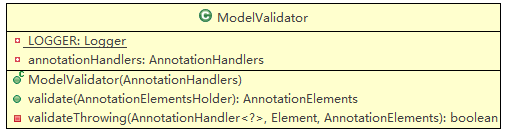
Each annotation corresponds to a Handler, such as @EActivity corresponding to EActivityHandler. Each Handler contains two methods, validate and process, used for validating and processing annotations, respectively.
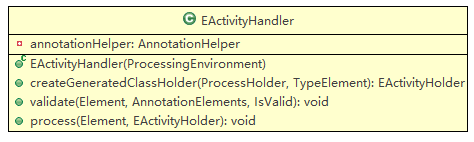
The AnnotationHandlers class in the handler package stores all handlers.
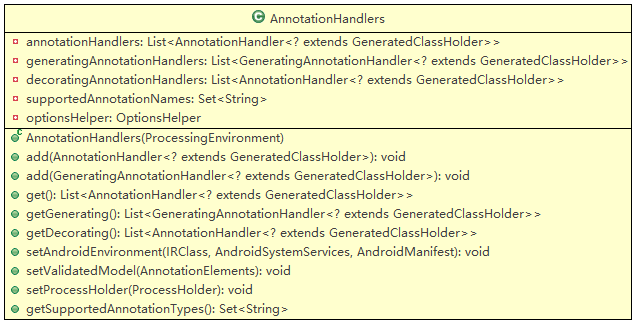
The validate method of each Handler uses ValidatorHelper to assist in validation, such as checking if a method is private or final, or if the class containing the annotation has the EActivity annotation (enclosingElementHasEActivity), etc.
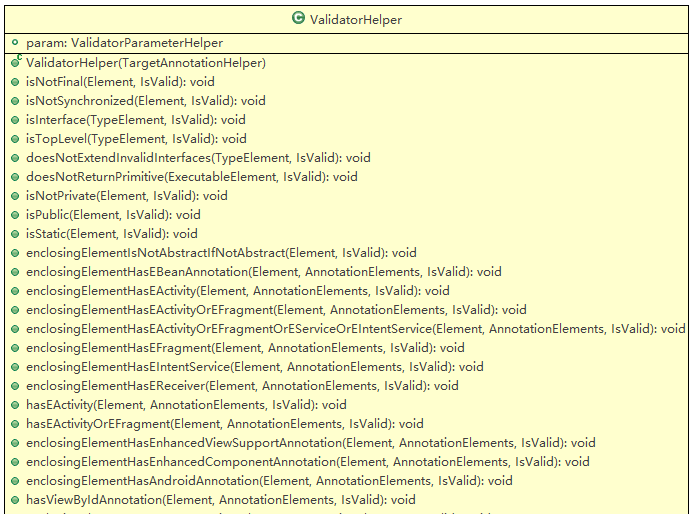
ValidatorHelper will use the AnnotationHelper class, which outputs warning and error messages through Logger. In the Logger part, AndroidAnnotations obtains javax.annotation.processing.Messager through the ProcessingEnvironment passed to the annotation processor. Using Messager, warnings and error messages can be reported to APT, allowing warnings and errors to be directly displayed at the error code locations in the IDE.
6. Process annotations
Completed by ModelProcessor in the process package
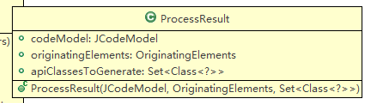
ModelProcessor retrieves the annotations validated by (process.)ModelValidator, and for the annotations that will generate classes (such as EActivity), ModelProcessor first generates the corresponding (holder.)GeneratedClassHolder to store the structure of the code to be generated, and then (handler.)AnnotationHandlers assigns the processing tasks to each handler, with the handler's process method completing the corresponding code for the GeneratedClassHolder. After processing is complete, the code to be generated is stored in (process.)ModelProcessor.ProcessResult.
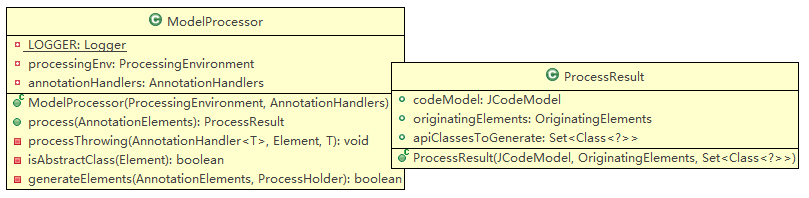
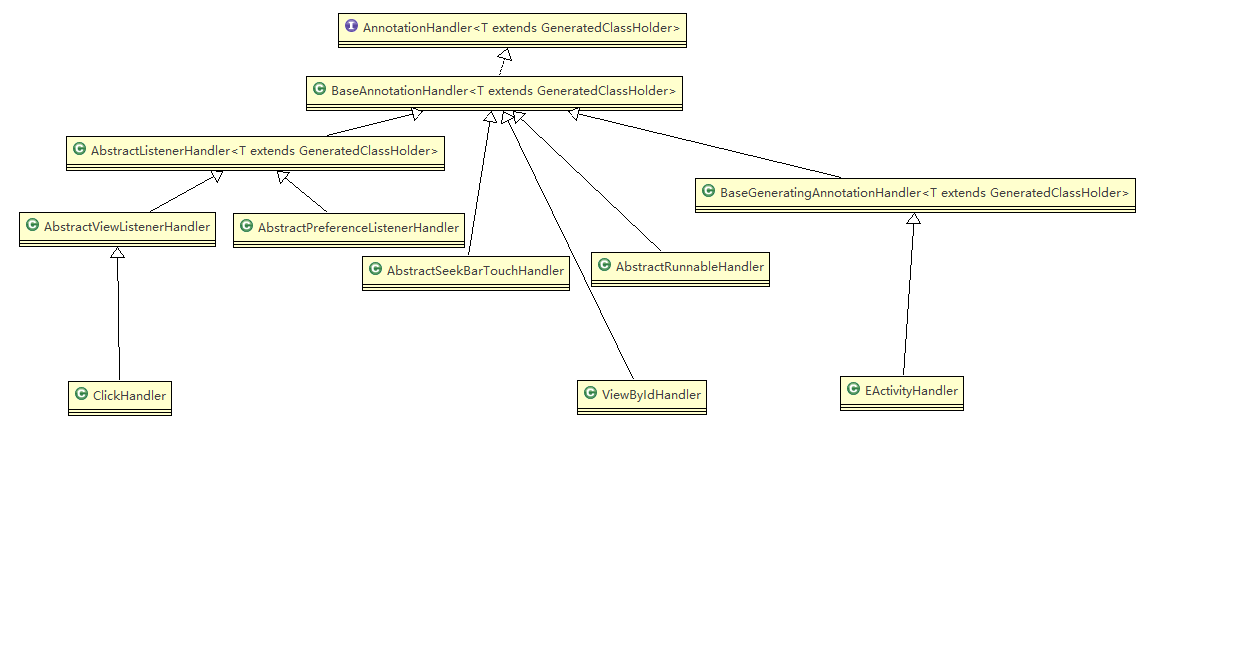
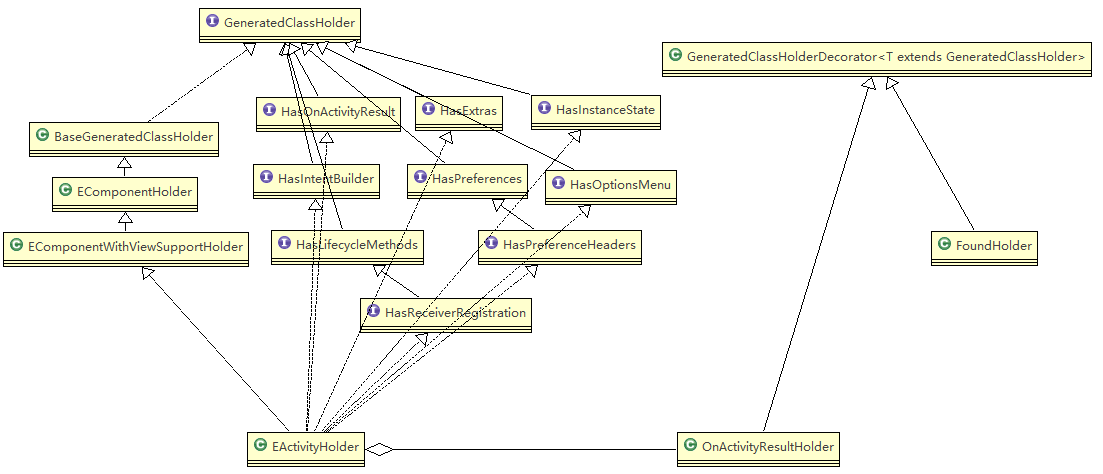
To better understand how annotations are processed, we need to first understand the classification and corresponding relationships of Annotation, Handler, and Holder.
Annotation
In AndroidAnnotations, annotations are divided into two main categories: one type is annotations that will generate classes (Generating), such as @EActivity, @EProvider, etc., and the other type is annotations used to supplement code in the classes generated by the former (Decorating), such as @ViewById, @AfterView, etc.
Handler
Corresponding to the two types of annotations, handlers are also divided into two types: GeneratingAnnotationHandler and DecoratingAnnotationHandler.
GeneratingAnnotationHandler inherits from BaseGeneratingAnnotationHandler and is used to handle annotations that will generate classes, such as EActivityHandler, EProviderHandler, etc. Other handlers belong to DecoratingAnnotationHandler, which are used to decorate and add code snippets to the classes corresponding to GeneratingAnnotationHandler, such as ViewByIdHandler.
Holder
GeneratingAnnotationHandler typically corresponds to a GeneratedClassHolder, which represents the class to be generated. For example, EActivityHandler corresponds to EActivityHolder.
BaseGeneratingAnnotationHandler supplements code in the GeneratedClassHolder. Some DecoratingHandlers use Decorator (also a type of Holder) to store a portion of code snippets, such as OnActivityResultHolder.
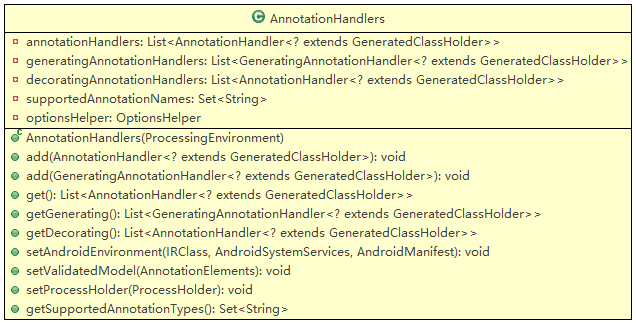
The AnnotationHandlers class in the handler package stores all handlers. AnnotationHandlers places all Handlers into annotationHandlers while also categorizing them into generatingAnnotationHandlers and decoratingAnnotationHandlers based on their types.
Now we can understand that annotation processing is divided into two steps:
-
Generate classes
Retrieve generatingAnnotationHandlers from AnnotationHandlers, first process the Generating type annotations to generate the corresponding ClassHolder to store the generated class. If the class being processed is an abstract class, skip processing. If the class being processed is an inner class and its outer class has not yet generated the corresponding ClassHolder, first process the Generating annotations on the outer class, and once the ClassHolder for the outer class is generated, then generate the ClassHolder for the inner class. -
Supplement code
Retrieve decoratingAnnotationHandlers from AnnotationHandlers, and when processing Decorating type annotations, first process the annotations on elements in ancestor classes, and then process the annotations directly on the class.
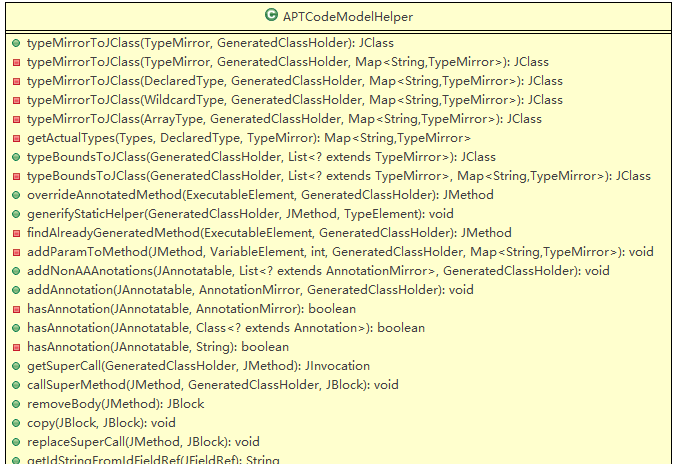
Each Handler's process method will use APTCodeModelHelper to handle the code model, such as finding methods (findAlreadyGeneratedMethod), overriding methods (overrideAnnotatedMethod), adding parameters to methods (addParamToMethod), etc.
The code elements obtained from APT are represented using javax.lang.model., while the code we are going to generate is represented using com.sun.codemodel., so APTCodeModelHelper will involve conversions between these two representations, such as typeMirrorToJClass. DeclaredType and JClass represent classes or interfaces in javax.lang.model.* and com.sun.codemodel.*, respectively.
7. Generate code
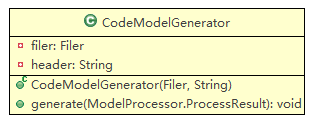
Completed by CodeModelGenerator in the generation package
CodeModelGenerator retrieves the processing results from (process.)ModelProcessor ((process.)ModelProcessor.ProcessResult) and generates code files from the results.
Comments
No comments yet. Be the first to comment!