
PMD Source Code Reading (1) - Introduction and Usage
During this period, I have been working on code analysis, so I want to understand the principles of related tools. PMD is a Java static code analysis tool that mainly includes two parts: duplicate code detection and code rule checking.
PMD Introduction
PMD Official Website: http://pmd.github.io
GitHub: https://github.com/pmd/pmd
1. Main Features
- Performs static code analysis using its built-in coding rules, primarily checking for potential bugs, unused code, duplicate code, and the creation of new objects within loops. Supported languages include Java, JavaScript, PLSQL, XML, XSL, etc.
- Supports developers in customizing code inspection specifications.
- Detects duplicate code (CPD, the copy-paste-detector), with support for languages including Java, C, C++, C#, Groovy, PHP, Ruby, Fortran, JavaScript, PLSQL, Ruby, Scala, Objective C, Matlab, Python, Go, Swift, etc.
2. Built-in Programming Standards
- Possible Bugs: Checks for potential code errors, such as empty try/catch/finally/switch statements.
- Unused Code (Dead code): Checks for unused variables, parameters, and methods.
- Complex Expressions: Checks for unnecessary if statements that can be replaced by while loops.
- Duplicate Code: Checks for duplicate code.
- New Object Creation in Loops: Checks for instantiation of new objects within loops.
- Resource Closure: Checks whether resources like Connect, Result, Statement, etc., are closed after use.
The Rule Set in the official documentation categorizes these rules and provides more detailed explanations.
Using PMD
1. Directory Structure
Download the Release version from the PMD official website (the version used in this article is 5.5.2), and the directory structure after extraction is as follows:
- bin:
- designer.bat: A GUI tool that converts Java code into an abstract syntax tree (AST).
- bgastviewer.bat: A GUI tool with similar functionality to designer.bat.
- cpd.bat: A command-line tool for finding duplicate code.
- cpdgui.bat: A GUI tool for finding duplicate code.
- pmd.bat: A file needed to run PMD on Windows platforms.
- run.sh: A file needed to run PMD on Linux platforms.
- lib:
- This directory contains the jar packages required for PMD to run, including third-party jar packages and various language module jar packages.
2. Basic Usage
Graphical Interface:
Tools like cpdgui.bat, designer.bat, etc., come with a GUI, and it's intuitive to use them once opened.
Command Line:
There are detailed usage instructions on the official website: Command line usage
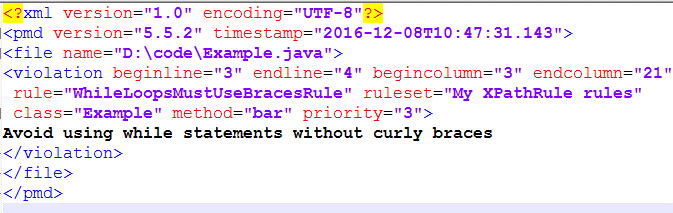
Example: pmd -d d:/code/Example.java -f xml -R rulesets/java/MyRuleSet.xml
Output:
3. Custom Rules
In addition to using PMD's built-in rules, we can also write our own rules to have PMD check the code according to our custom specifications.
Example: We define a rule that requires While loops to use braces.
We can customize rules using either Java code or XPath queries.
Java Code Implementation
- Download the PMD source package from the official website and extract it; the extracted directory will be pmd-src-5.5.2.
- Write the WhileLoopsMustUseBracesRule.java file and place it in the pmd-src-5.5.2\pmd-java\src\main\java\net\sourceforge\pmd\lang\java\rule directory.
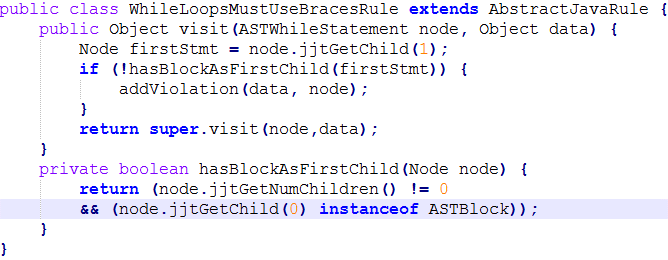
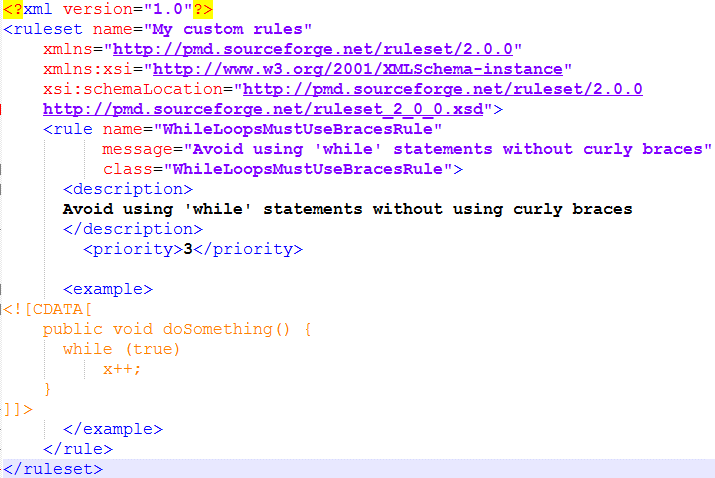
- Write the MyRuleSet.xml file and place it in the pmd-src-5.5.2\pmd-java\src\main\resources\rulesets\java directory.
- Execute mvn clean package -Dmaven.test.skip=true in the pmd-src-5.5.2\pmd-java directory to repackage, and replace the original jar package in pmd-bin-5.5.2\lib with the new pmd-java-5.5.2.jar.
Run the command pmd -d d:/code/Example.java -f xml -R rulesets/java/MyRuleSet.xml to use this rule to check the code.
XPath Query Implementation
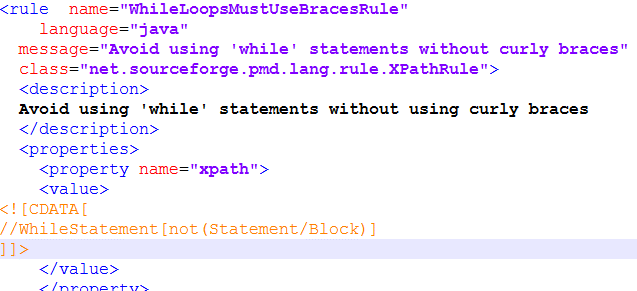
The XPath expression //WhileStatement[not(Statement/Block)] can match all WhileStatement nodes in the abstract syntax tree that do not have Statement/Block substructures.
Write MyRuleSet.xml and place it in the rulesets\java directory inside pmd-bin-5.5.2\lib\pmd-java-5.5.2.jar.
Run the command pmd -d d:/code/Example.java -f xml -R rulesets/java/MyRuleSet.xml to use this rule to check the code.
Comments
No comments yet. Be the first to comment!